Sometimes events are added to the njlegalize.me calendar by our team or community members before the organizer has claimed them. If you're the organizer, venue, or promoter behind an event that's already listed, claiming it gives you full control — you can edit the details, manage RSVPs, and boost visibility.
Step 1: Find the Event on the Calendar
Go to the Events Calendar (the 📅 Events menu → NJ Cannabis Events) and locate your event. You can use the search or filter by category and city. Click the event to open the detail page.
Step 2: Find the Claim Option
On the event detail page, look for the "Claim this event" option. If the event is currently unclaimed, this link will be visible on the page.
Step 3: Log In or Create an Account
You'll need a verified njlegalize.me account to submit a claim. If you're new to the platform, register for free. See our guide: How to Create a New User Account.
Step 4: Complete the Claim Form
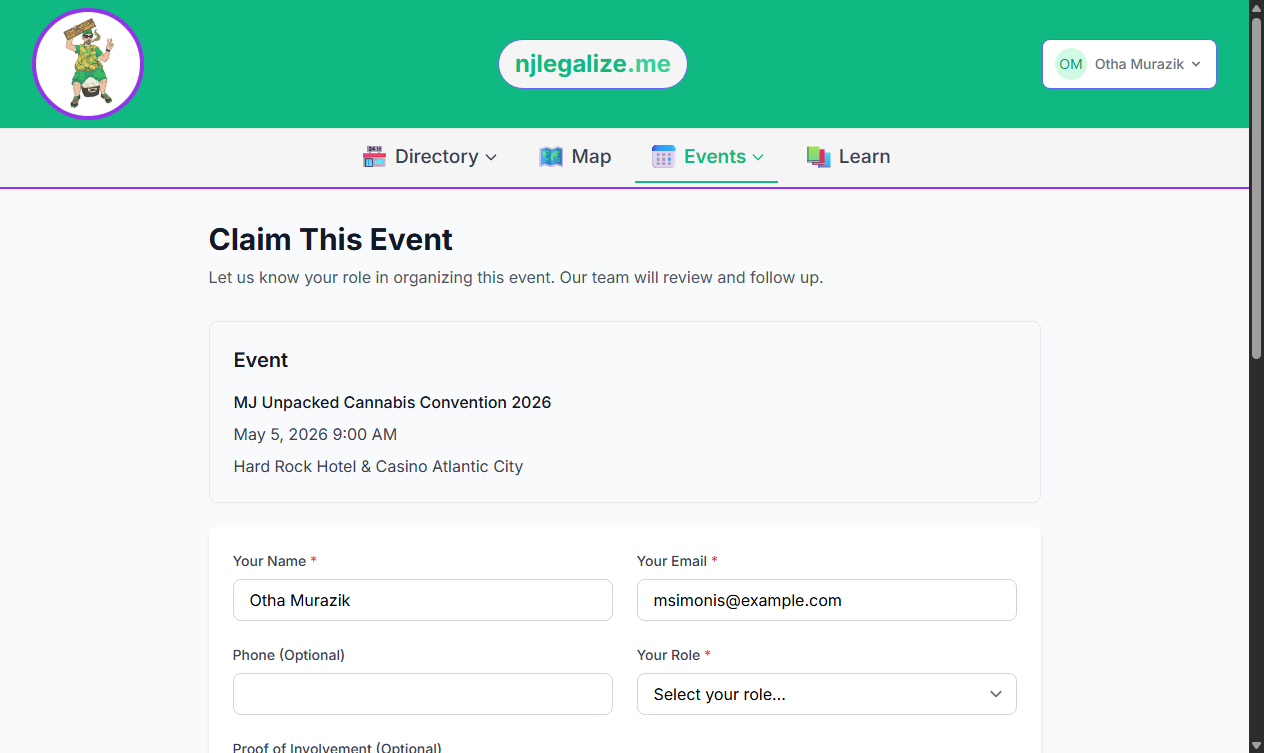
The event claim form asks for:
- Contact name and email — your name and a reachable email address
- Phone number — optional, but helpful for faster verification
- Your role — select whether you're the organizer, venue, promoter, or have another connection to the event
- Proof document — optional, but you can upload a PDF, JPG, or PNG (up to 5MB) if you have documentation confirming your connection to the event
- Additional notes — any context that helps verify your claim
Step 5: Submit and Await Review
Click Submit Claim. The njlegalize.me team will review your submission and follow up if needed. Claims are typically processed within 24–48 business hours.
After Your Claim Is Approved
Once approved as the event owner, you can:
- Edit the event title, description, dates, venue, and image
- View and manage RSVPs
- Boost the event to increase its visibility in the calendar
- Submit future events directly from your account
If you'd like to submit a new event rather than claim an existing one, see our guide: How to Submit a New Event.